Nimbuzz loves Apple - NEW Mac and iPhone!

With the new Nimbuzz Mac you can connect and interact with friends from the most popular instant messaging communities and social networks like, Facebook, AIM, MySpace, Google Talk (Orkut), Yahoo! Messenger, Windows Live Messenger (MSN), ICQ and many more, right from your (i)Mac or MacBook (Pro).

Nimbuzz Mac also lets you call your buddies on Nimbuzz, Windows Live Messenger (MSN), Yahoo Messenger and Google Talk.

The iPhone and iPod touch upgrade lets you share photos, music and videos. The beauty of it is that the files are stored online so you have access to your files from your Mac, iPhone or iPod touch!! That also saves device memory :)

It is here: Push Notification for iPhone and iPod Touch - with home screen alerts of incoming calls or chats, effectively keeping you available to the rest of the world even though the app itself has been closed. You can enable Push Notification you by going to: Settings -> Stay Online -> Select the period you want to remain stay connected after you close Nimbuzz.

If you have questions in regards to the Push Notification feature, please the visit the official Apple page, it’s a great resource to get answers!

We also introduced another much requested feature: location sharing. Now you can share and retrieve the location of your Nimbuzz buddies on the go. This makes it easier to find your friends and set up face to face meetings.

Download, explore and enjoy the new Nimbuzz Apple suite: Mac [download Nimbuzz for Mac] and iPhone [download Nimbuzz for iPhone] - let us know what you think!


source : http://blog.nimbuzz.com

Mark Zuckerberg

Mark Elliot Zuckerberg (lahir di White Plains, New York, 14 Mei 1984; umur 25 tahun). Anak dari Edward dan Karen Zuckerberg. Ia adalah seorang programer komputer dan pengusaha asal Amerika Serikat. Menjadi kaya di umurnya yang relatif muda karena berhasil mendirikan dan mengembangkan situs jaringan sosial Facebook di saat masih kuliah dengan bantuan teman Harvardnya Andrew McCollum dan teman sekamarnya Dustin Moskovitz dan Crish Hughes. Saat ini ia menjabat sebagai CEO Facebook.

Forbes mencatatnya sebagai milyarder termuda, atas usaha sendiri dan bukan karena warisan, yang pernah tercatat dalam sejarah. Kekayaannya ditaksir sekitar satu setengah miliar dolar Amerika.

Awal tahun 2009 Mark Zuckerberg mendapat penghargaan Young Global Leaders.


source : http://id.wikipedia.org

How to “Friend” Someone on Facebook & Hide It From Your Status Updates

On your Facebook home page, you should see the ‘Settings’ menu close to the search field on your upper-right. Open that menu and go to ‘Privacy Settings’.

facebook privacy settings friends

On the next page, you’ll have four choices: Profile, Search, News Feed, and Applications. What you’ll want to edit here are your Profile privacy settings.

By default, everything on your profile is limited to your Friends and your Networks (your first Network is likely your city of residence, but you may have joined more). From the screenshot above, you can see that I’ve limited everything on my profile to my Friends and their Friends. Anyone else who visits my profile will only see that I have a profile, but will not see what’s on it.

In my example, you’re going to want to edit the setting on your Status Updates, since you don’t want your boss to know that you’ve “fanned” the competition. Click that dropdown menu and then select ‘Customize’.

You may want to tweak your overall privacy setting here, but what we’re aiming for is the “Except These People” list at the bottom of this dialog. Type out the name of any of your Friends to restrict that person from viewing anything in your Status Updates.

source: http://www.makeuseof.com

How to Place Facebook Chat On Firefox Sidebar

Facebook Chat is cool, at least it allows you to send instant messages to online Facebook contacts. However I’m not really a fan of the chat bar being at the bottom of the page, what if I’ve left Facebook but still wants to remain chatting with my Facebook contacts? If you are using Firefox, you can place the Facebook Chat at the sidebar.

Step 1

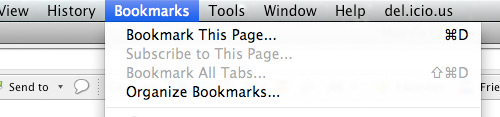
Look for Bookmarks on the top navigation. Select Organize Bookmarks…
facebook chat

Step 2

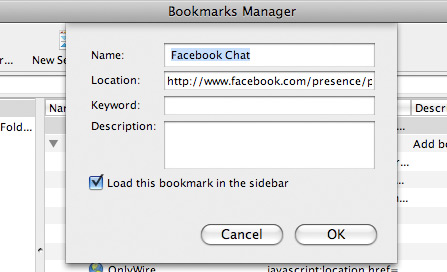
Click New Bookmark... tab and enter the following:

  • Name: Facebook Chat
  • Location: http://www.facebook.com/presence/popout.php
  • Check Load this bookmark in sidebar.

fchat02.jpg

Step 3

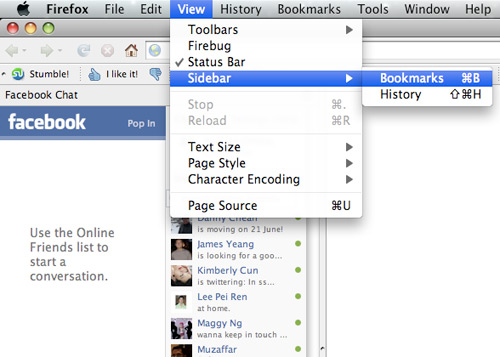
Launch the Firefox sidebar, click Facebook Chat and start chatting with your Facebook contacts within Firefox.

fchat03.jpg


source: http://www.hongkiat.com

How to Make Money with Adsense

Google AdSense is the Google program where you can host pay-per-click ads on your Website. When someone clicks an ad, you earn money. Simple as that.Is it really as easy to make money with Google AdSense as many would lead you to believe? Now that I've become heavily involved with managing Google AdSense programs for my clients, I can see it's not all play and no work.Unfortunately, a lot of people bought into the idea that there was a lot of easy money to be made and they are now finding out they aren't making nearly as much as they thought they would. Additionally, Google has a lot of prohibited practices when it comes to AdSense, and too many Webmasters are finding out they violated Google's policies after the fact - often because they never bothered to read the AdSense policies in the first place.

Webmasters must not only comply with AdSense policies, but their Websites must also comply with Google's webmaster policies.

Prerequisites for Making Money with AdSense

To make money with Google AdSense you need plenty of traffic coming in to your site or there won't be anyone to click the ads. Website promotion techniques, especially search engine optimization and article marketing will bring more traffic to your site. You also need to have content that will attract the ads with the highest Pay Per Click (PPC) rate that are relevant to that content. Then, you need to lay out your web pages so the ads blend in with your site. Studies have revealed that people who visit sites that contain ads that use colors that are not in harmony with the actual Web site tend to develop "ad blindness". Meaning no matter how much traffic comes into your site, chances are no one will click the ads because they'll be ignoring them. If no one clicks, you make nothing.

Dealing with Competitors' Advertisements

If you offer products or services on your Website, the first thing you'll notice when you begin hosting PPC ads is that many of the ads are coming from your competitors. Therefore, you'll want to put ads on pages that aren't earning you any money, or do like I did and not put ads on your site until you're so busy anyway you'd rather make a few dollars off of your competitors than to continue turning business away with nothing to show for it.

Google AdSense allows you to specify up to 200 URLs for sites you want to bar from placing ads on your pages. The problem is that most times you won't know the competitors are out there until their ads appear.

Google Money Making Ad Options

Google offers three ways to make money from them:
  • Google AdSense for Content - A variety of size and shape ads for placing in your content are available. These can be text or image ads or both - you specify what you'll allow. Ad units are full ads. Link units are simply a strip of text links that your visitors might want to click. Google allows you to put up to 3 Ad Units and 1 Link unit on each page of your Web site, provided you follow its policies - both for AdSense and for Webmasters.
  • Google AdSense for Search - This places a search box on your Web site. When a user enters a term and conducts a search, a search results page opens, that hosts more pay-per-click ads. You can customize the color scheme of the search results page to harmonize with your web site.
  • Google Referrals - Here you make money by referring visitors to use a Google product, like AdSense, AdWords, the Google Toolbar and other Google software. Just like Google AdSense for Content and AdSense for Search, Google generates the code that you paste into the desired location on your web page. You can choose from a wide variety of buttons and text links of different colors. As an example of how Google Referrals works, if someone goes to your site and clicks the link and signs up for an AdSense account, when that person earns a $100 from Google AdSense and receives a payout from Google, you'll also receive $100 for referring them. This is a great idea to me, because you can be the world's worst Google AdSense advertiser, but if an ad dynamo happens to visit your site and uses your referral link, you can make money anyway!

Google AdSense Payments

Google will not issue an AdSense payment until your earnings exceed $100. Unfortunately, there are loads of Google AdSense Forum entries about website operators who accumulated $90 or more in click through earnings only to get banned from Google and not get paid anything at all before they ever reached $100. This may be because Google doesn't take a close look to see if you're complying with their guidelines until it comes time to pay you. So yes, there's a lot more to the story than meets the eye.

Other Programs Besides AdSense

Yahoo and MSN have similar programs, although those programs aren't as well-developed as Google AdSense and there aren't as many available advertisers to display ads on your site. The fundamentals for making money are the same: You still need plenty of traffic, you still need high-paying ads, and you still need to design your site to harmonize with the ads to get people to click.

source : http://homebusiness.about.com

How to Create Google Adsense Account

Today google adsense maybe the most popular money machine in the internet, but many people not yet known how to make google adsense account. Before creating adsense google account you must have a website or blog which have online in the internet. you can use free blog like blogspot or use free website hosting.

To make google adsense account following this steps :

1. Open google adsense website, http://www.google.com/adsense then click Sign Up Now

2. Type your account informations :

Website information

  • Website url : your web or blog URL
  • Website language : choose used Ianguage in yours web or blog

Contact information

  • Account type : choose individual or business
  • Country or territory : select your country
  • Payee name : typing your complete name here.
  • Street address : typing your address here. this address is used for delivery of cheque.
  • City/town : typing your town
  • State : where is your state
  • Postal code
  • Phone

3. if you have been filled all, click Submit Information.

Google will review your application. Waiting 1-5 days to see your google adsense account is accepting by google or not, you will get email confirmation from google. If not try again with other blog or website.

source : http://tricks-collections.com


Quickly Increase Your Google Adsense Earnings

Every Adsense publisher can significantly increase their Adsense earnings by choosing the best Adsense keyword and the top paying Adsense keyword. This article will discuss how to increase your adsense earnings by at least 200 percent by using the best Adsense keyword.
The Google Adsense program has become a favorite of many internet marketers in increasing their online income. One of the keys to increasing your Adsense income is by increasing the amount of traffic to your website. Another easy method for increasing your Adsense earnings is by placing the best Adsense top paying keyword on all your Adsense websites and web pages. As well as finding the best Adsense top paying keyword, the secret is making sure your website is relevant to your chosen best Adsense keyword. Make sure your main keyword is in your h1 header tags, in the title of your web page, in your web page description and also in your meta keywords.
Make sure your best top paying Adsense keyword is in your heading, and preferably the first words used. Make sure your best top paying Adsense keyword features prominently in the first paragraph of your web content, but make sure that the website copy makes sense. If you have any images on your phrase use the alternate text image description as another place to put your best high paying Adsense keyword, however describe the image, don’t just place the keyword in it. If you are an Adsense publisher then it’s absolutely critical that you focus on finding the best top paying Adsense keyword for every page of your websites. The reason for this is pretty clear.
One keyword may be worth $17.00, a very similar keyword may be worth $2.20. You of course won’t get the full $17.00 every time a visitor to your website clicks on your Adsense ads. You and the Google Adsense program will share this revenue. When you know what your potential site visitors are looking for and have optimized your Adsense web pages for the best top paying Adsense keyword, the more visitors to your website the more clicks you should receive. Another factor to bear in mind is that the older your website is, the better Google Adsense ads will appear on your site.
Your Google Page Rank will also have an effect on this, as will your website traffic. Also don’t just focus your entire website on your best top paying Adsense keyword. There is a lot of competition for certain Adsense keywords. As well as finding the best Adsense top paying keyword, the secret is making sure your website is relevant to your chosen best Adsense keyword.
Make sure your main keyword is in your h1 header tags, in the title of your web page, in your web page description and also in your meta keywords. By using certain Adsense keyword tools you can find more long tail keywords with very little competition at all which, when you add them up with other long tail keywords, will add up to a lot of traffic and more Adsense earnings.
This article has discussed the difference between ordinary keywords and having your site optimized with best top paying Adsense keywords. Now that you know how to do that you must find the right tools to optimize your sites for the highest paying Adsense keywords.

source : http://www.toptut.com